Set your own margin
Your agency sets the commission rate, and it can differ by product.
Global OTA hotel inventory becomes products on your agency's website. You set the margin.
Talk to Sales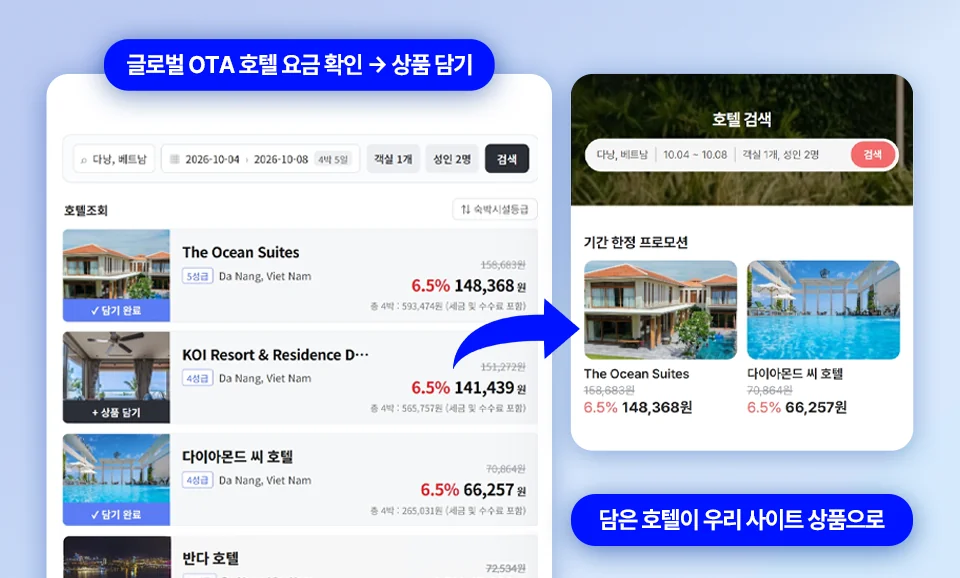
Start without signing contracts with individual hotels. Choose just the destinations you want from global OTA real-time inventory and sell them on your own site.
Search global OTA hotel availability and rates in real time.
Show only the destinations and hotels your customers look for.
A hotel sales page is created automatically on your company website.
After the sale, track bookings and settlement in EODING ERP.
Your agency sets the commission rate, and it can differ by product.
Show only the places your customers are looking for.
Sell instantly to customers looking for a specific hotel with a single link.
Travel agencies with their own hotel contracts start with a consultation with the EODING team
Paired with search marketing, it is a proven way to drive sales.
Yes. Real-time hotel sales use global OTA inventory, so no contracts with individual hotels are needed. Just choose your destinations and hotels and start right away.
Enter your commission rate directly in the EODING admin screen. You can set one rate for everything or set rates by destination or hotel, and changes appear on your sales page immediately.
In the EODING ERP settlement screen. Each booking shows the sales channel it came through and its margin, along with totals by period.
A dedicated consultant will contact you within 1 business day.